Typeform brand guidelines
Typeform's brand overview page presents the core visual identity, covering voice, logo anatomy, color swatches, and interface examples on a single page built on Webflow.
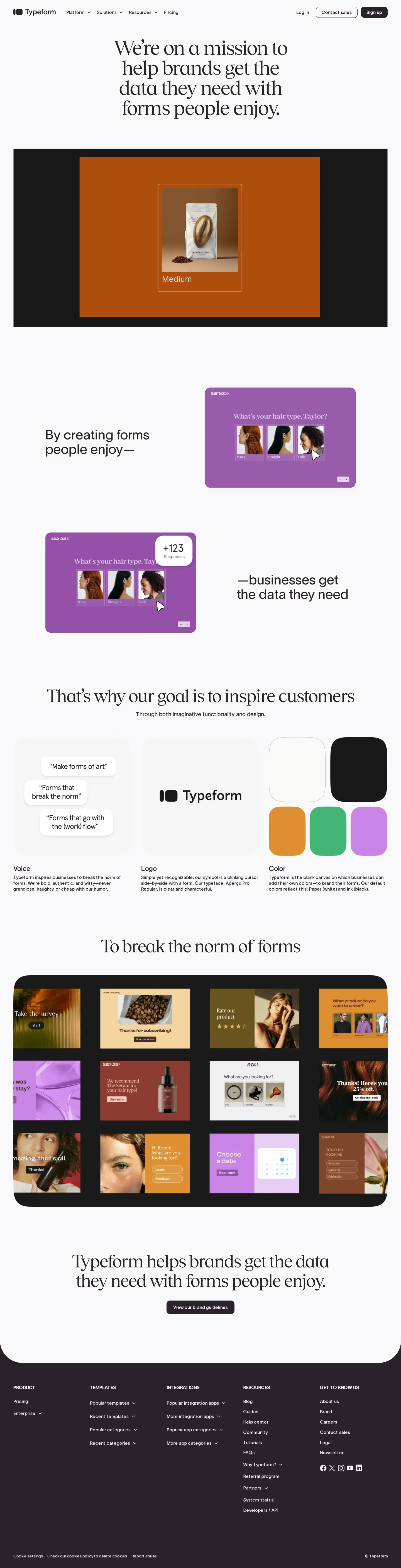
Brand overview landing page showing the three-column layout for voice, logo, and color swatches.
Want a brand center like Typeform’s?
Create your brand center with Freedam ↗Freedam's take
When I looked through Typeform's brand page, I was struck by how cleanly they condense their core identity onto a single overview canvas. Instead of burying basics behind deep directories, they lay out voice, logo, and color swatches side by side in a crisp three-column arrangement. I especially appreciated the explanation of their blinking cursor symbol sitting right beside the wordmark, and the playful quote bubbles that demonstrate tone rather than just describing it. It feels like an inviting introduction to the aesthetic, giving designers an instant visual grasp of the system.
At a glance
- Sections
- Voice · Logo · Color
- Tone
- Warm, conversational, and direct, highlighting forms designed to break standard conventions.
What I noticed
- The brand landing page uses a three-column layout covering Voice, Logo, and Color.1234
- The Voice section illustrates conversational tone using sample quote bubbles.5
- The Logo block details the lockup along with an explanation of the blinking cursor symbol and typeface.6
- The Color section presents rounded rectangular swatches displaying white, black, orange, green, and lilac.7
Numbers refer to the screenshots above.
What I could not see
- Could not inspect the full brand guideline documentation linked behind the 'View our brand guidelines' button.
- Could not view individual downloadable logo file formats or vector assets on the brand overview screen.
Ideas to borrow
- Teams can pair an abstract brand symbol like a cursor with a concrete rationale right next to the logotype on the main landing view.6
Reviewed on 18 October 2026. Request a correction · I built this