Neon brand guidelines
Neon provides a straightforward single-page brand guide featuring logo variations, spacing rules, color codes, and immediate file downloads.
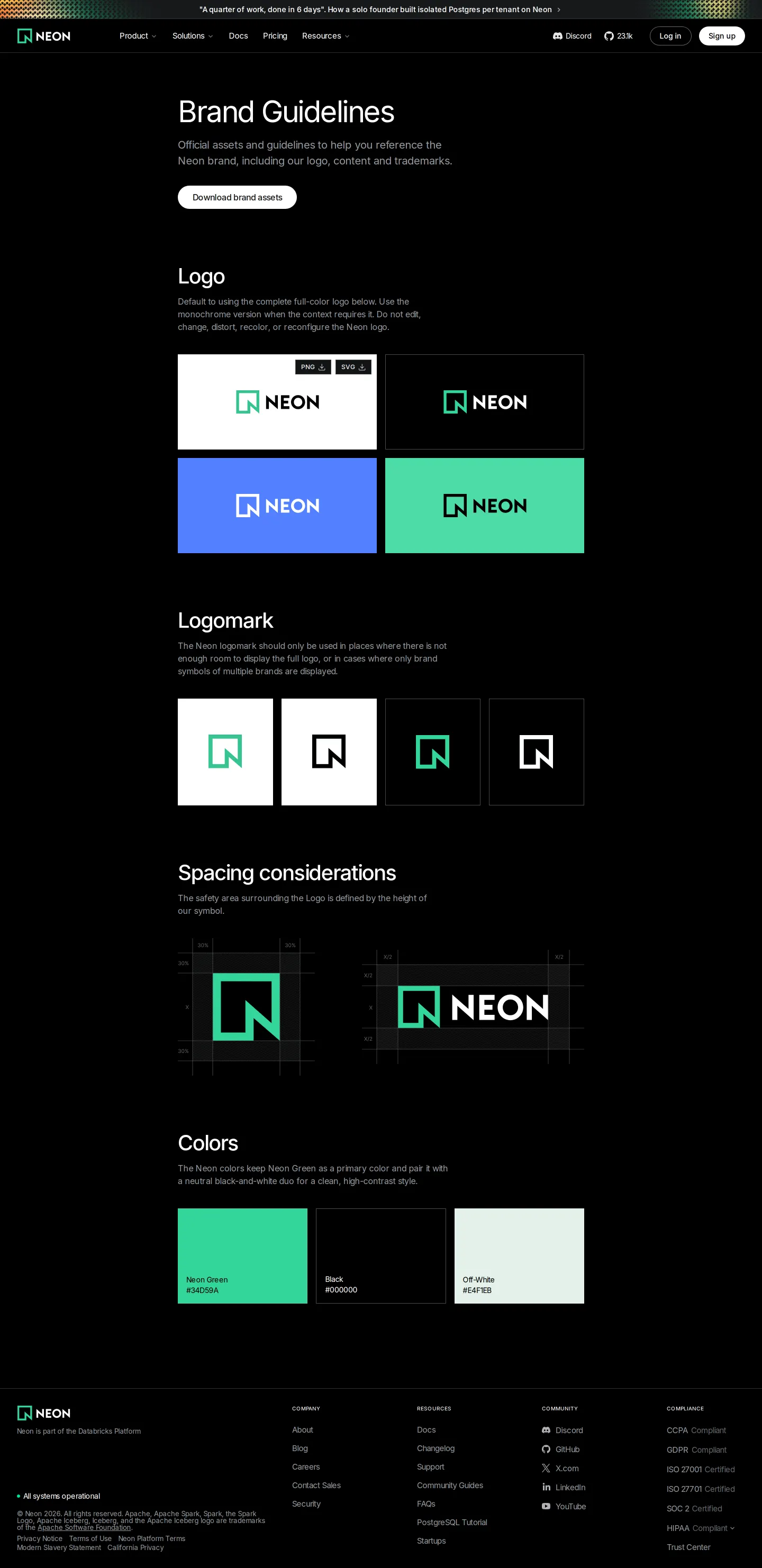
Neon brand guidelines page displaying logo downloads, background variations, clear space guides, and color values.
Want a brand center like Neon’s?
Create your brand center with Freedam ↗Freedam's take
I like how direct this single-page reference is. When I land here, I get straight to the essential building blocks of the Neon brand without any unnecessary friction. The page presents full logo lockups on varied background tiles, isolates the logomark, and immediately shows the math behind the clear space rules. Having quick download buttons for PNG and SVG files right alongside the graphics makes picking up an asset effortless, and having the full asset archive bundled at the top is a practical touch for anyone needing the complete kit.
At a glance
- Sections
- Brand Guidelines · Logo · Logomark · Spacing considerations · Colors
- Downloads
- ZIP, PNG, SVG
- Tone
- Clear, practical, and focused entirely on quick access to foundational brand assets.
What I noticed
- A primary call to action offers a download link for the full brand assets ZIP archive at the top of the page.12
- The Logo section offers direct downloads for both PNG and SVG formats alongside displays on white, black, blue, and green tiles.34
- Clear space specifications are diagrammed with mathematical annotations for both the standalone logomark and the full logo.5
- The Colors section provides color swatches displaying names and hex codes for Neon Green, Black, and Off-White.6
Numbers refer to the screenshots above.
What I could not see
- Typography rules and font download links were not visible on the captured page.
- Comprehensive co-branding, do and don't application examples, or voice guidelines were not documented on screen.
Ideas to borrow
- Place immediate format-specific download buttons directly beneath logo previews so visitors do not have to download an entire archive for a single asset.3
Quick answers
Where can I download the Neon logo files?
You can download individual PNG and SVG files directly in the Logo section, or download the full asset bundle via the 'Download brand assets' link at the top of the page.123
What primary colors are defined in the Neon brand palette?
The page defines three primary colors with names and hex codes: Neon Green, Black, and Off-White.6
What are the clear space requirements for the Neon logo and logomark?
The Spacing considerations section diagrams a clear space margin of 30% around the logomark and X/2 around the full logo lockup.5
Reviewed on 25 September 2026. Request a correction · I built this
Similar brand centers
All brand guidelines →