brandcenter.gallery
Create your brand center with Freedam

Deno press and asset kit

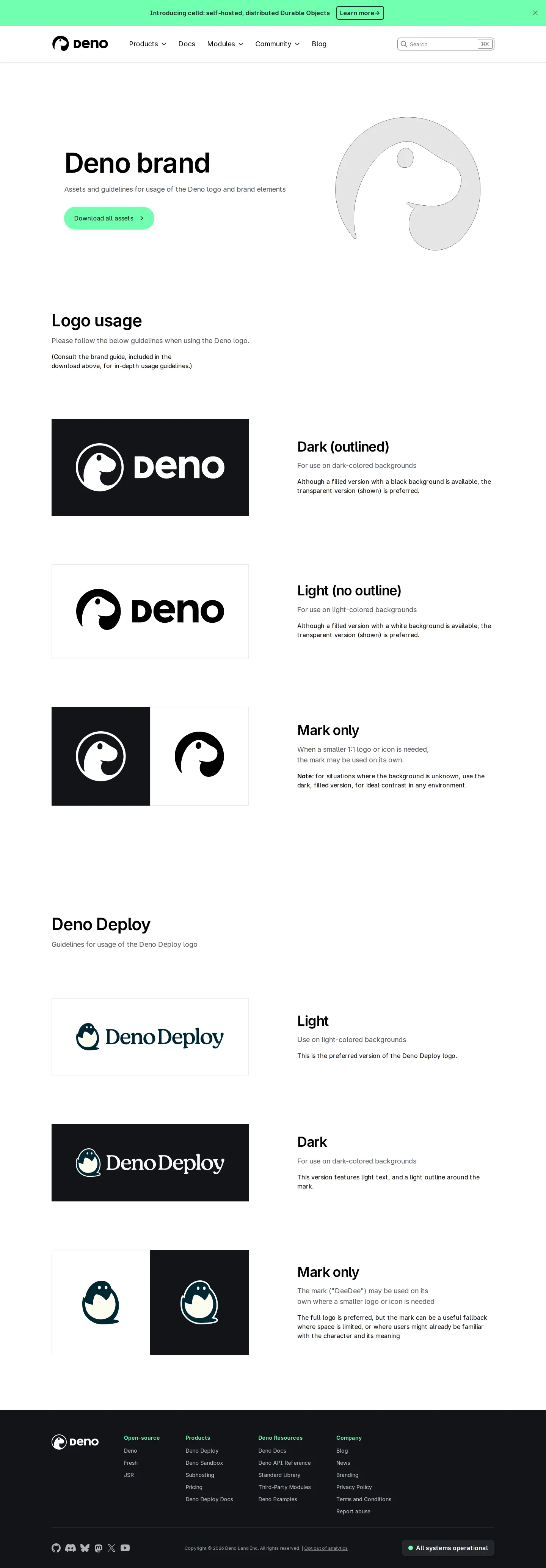
Deno provides a focused brand page highlighting logo variants, background rules, and a single asset bundle download for Deno and Deno Deploy.
Visit Deno's brand center ↗ Build one like this ↗
Branding Captured 15 Sep 2026

Brand page showing logo usage, background rules, and Deno Deploy variations with an asset download link.

Want a brand center like Deno’s?

Create your brand center with Freedam ↗

Freedam's take

I like how direct Deno keeps their brand page. Instead of overwhelming visitors with extensive brand doctrine, it focuses squarely on clear logo usage for both Deno and Deno Deploy. I noticed how each variant sits inside contrasting preview cards, demonstrating dark, light, and transparent background behavior. There is a simple call to download all assets in a single bundle, which saves time for anyone looking for the right mark. It feels lean, practical, and tailored to developers who need official files without fuss.

At a glance

Sections
Logo usage · Deno Deploy · Open-source · Products · Deno Resources · Company
Downloads
ZIP
Tone
Direct, practical, and focused on essential logo guidelines.

What I noticed

  1. The page organizes logo usage into dark outlined, light, and mark-only versions across both Deno and Deno Deploy.1234567
  2. Each logo variant is shown inside rectangular preview boxes demonstrating presentation on dark and light backgrounds.8
  3. The site provides a 'Download all assets' button pointing directly to a ZIP archive.910
  4. The page includes written guidance on light versus dark background usage alongside preferences for transparent versions.11

Numbers refer to the screenshots above.

What I could not see

  • Could not inspect the contents of the downloadable ZIP archive.
  • Could not verify color hex values, typography specifications, or clear space diagrams as none were visible on the captured page.

Ideas to borrow

  1. Display logo variations directly in dark and light preview cards alongside background application rules on a single screen.118

Quick answers

Where can I download the Deno logos?

A 'Download all assets' button is provided at https://deno.com/logos/deno_assets.zip.910

Reviewed on 25 September 2026. Request a correction · I built this

Similar brand centers

All brand centers →

Deno keeps its identity page minimal with a single ZIP archive link and inline previews for Deno and Deno Deploy logos. In contrast, Shopify provides dedicated ZIP downloads broken out for individual marks alongside explicit digital and print clear space measurements.