Blender brand guidelines
Blender provides a single-page brand guide detailing logo specifications, color codes, community badge downloads, and usage rules for film credits.
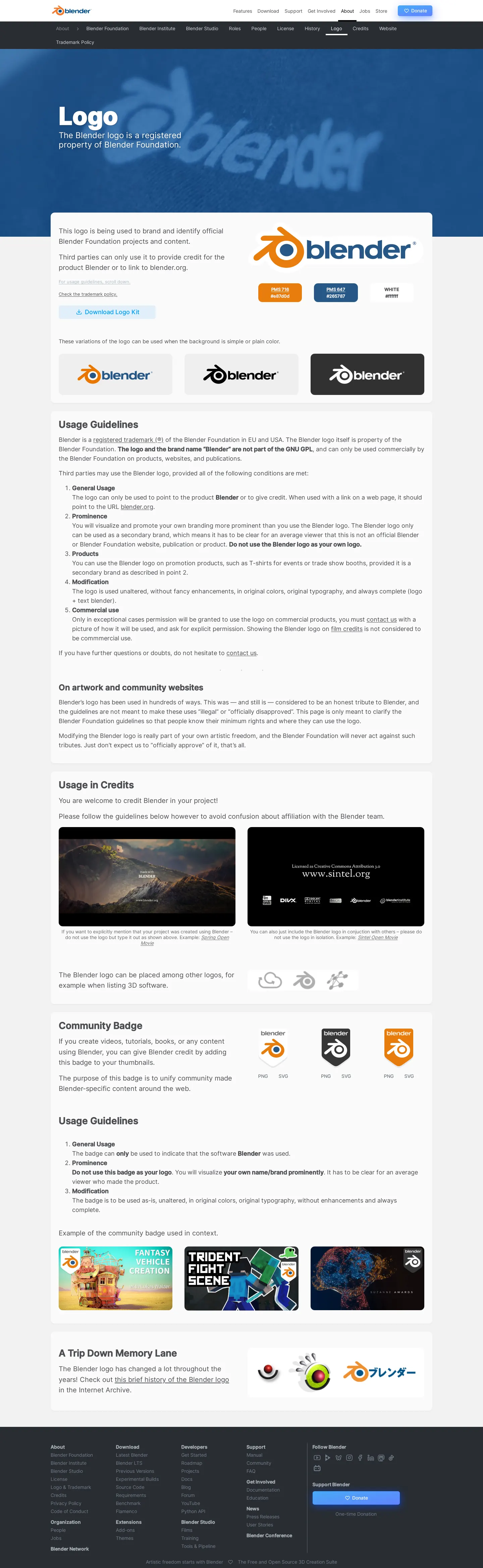
Blender logo guidelines page presenting brand identity rules, color specifications, community badges, and usage examples.
Want a brand center like Blender’s?
Create your brand center with Freedam ↗Freedam's take
I really appreciate when an open-source tool treats its identity with the same care as its software. Blender provides a focused, single-page reference for its emblem, laying out color swatches with PMS and hex values alongside clear monochromatic variants. What caught my eye is how tailored it feels to their actual community: you get explicit guidance for film credits, citing examples like Spring and Sintel, plus downloadable community badges in PNG and SVG. I also love the small historical retrospective at the bottom, offering a candid look back at how the symbol has evolved over time.
At a glance
- Sections
- Logo · Usage Guidelines · Usage in Credits · Community Badge · A Trip Down Memory Lane
- Downloads
- ZIP, PNG, SVG
- Tone
- Clear, practical, and community-oriented guidance tailored for digital creators and open-source contributors.
What I noticed
- The page displays the primary Blender logo accompanied by color swatches showing PMS and hex codes.1
- Usage guidelines cover general usage, prominence, products, modification, and commercial use.2
- Instructions and film credit examples are provided for projects like Spring Open Movie and Sintel Open Movie.3
- Downloadable Community Badge variants are offered in PNG and SVG formats across white, black, and orange versions.45678910
- A section titled A Trip Down Memory Lane presents historical iterations of the logo.1112
Numbers refer to the screenshots above.
What I could not see
- Typography rules, font downloads, and editorial voice guidelines are not shown on this page.
- No digital UI kit or broader application guidelines beyond the logo were visible in the capture.
Ideas to borrow
Quick answers
Where can I download the official Blender logo kit?
A zipped logo kit can be downloaded directly using the 'Download Logo Kit' link on the logo page.1314
Reviewed on 25 September 2026. Request a correction · I built this