DreamHack brand guidelines
DreamHack's single-page brand guide details primary and secondary logos, a nine-color palette with twelve pre-approved pairs, and links to asset folders on Google Drive.
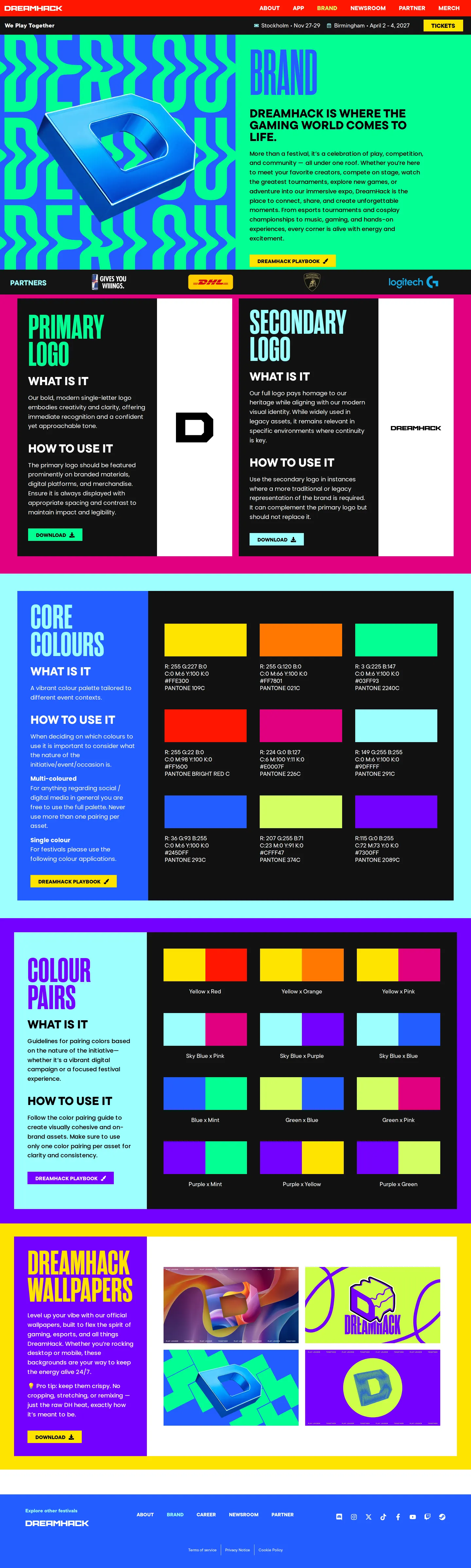
DreamHack brand guidelines displaying primary and secondary logos, color swatches with values, two-color pairings, and wallpapers.
Want a brand center like DreamHack’s?
Create your brand center with Freedam ↗Freedam's take
I like how direct this single-page brand guide is for DreamHack. Instead of locking assets away in a complicated portal, it lays out the essentials on one page. You get the primary single-letter mark, the secondary wordmark, and clear instructions on when to use each. The color palette provides detailed color codes across print and digital, but the standout feature is the dedicated section of twelve paired combinations. Giving teams pre-approved dual tones takes out all the guesswork, and linking straight to Google Drive folders keeps downloads simple.
At a glance
- Sections
- BRAND · PRIMARY LOGO · SECONDARY LOGO · CORE COLOURS · COLOUR PAIRS · DREAMHACK WALLPAPERS
- Downloads
- Google Drive links
- Tone
- Energetic, clear, and focused on practical visual rules for gaming and event identity.
What I noticed
- The guide covers both the primary single-letter 'D' mark and the secondary wordmark with rules on what they are and how to use them.123
- The Core Colours section outlines nine swatches complete with RGB, CMYK, HEX, and Pantone specifications.45
- A Colour Pairs section defines twelve split two-color pairing combinations with specific usage rules.67
- Downloads are routed outward to Google Drive folders rather than hosted directly on-site.89
Numbers refer to the screenshots above.
What I could not see
- Could not inspect the contents of the linked external Google Drive folders or the DreamHack Playbook link.
- Could not view explicit typography guidelines or downloadable font packages on screen.
Ideas to borrow
Quick answers
Reviewed on 25 September 2026. Request a correction · I built this
Similar brand centers
All brand guidelines →DreamHack presents its visual identity on a single page with logo rules and color combinations routed to Google Drive links. In contrast, BLAST organizes its media assets across separate intellectual properties with section-level search, while Twitch provides a minimal landing page focused on a direct zip file download.